













How to correctly add a bot?
The bot is added to the administrators of your channel in order to automate the processes of advertising, its removal, as well as monitoring the statistics of your channel. Common problems and their solutions are described below, and of course, detailed instructions on how to add a bot correctly.
I already have 200 subscribers and no more can be added
When adding a bot, a "200 subscribers problem" occurs. This is when you can’t add a bot, because there are already more than 200 subscribers on the channel, and telegram forbids you to add another one. The reason for this problem is that you need to add the administrator and not the subscriber. You need to go to the edit menu of your channel, then “Administrators”, and at the bottom of the window you will see the “Add Administrator” button. See instructions below.
I added a bot, but I can’t add a channel.
Most likely the reason for this problem is connected with the same “200 subscribers problem”, only you have less than 200 subscribers, and you still managed to add the bot as a subscriber and not an administrator. Follow the instructions below and everything will work out.
Add bot correctly
Click on the name of your channel, and get into the "Channel Information" menu.
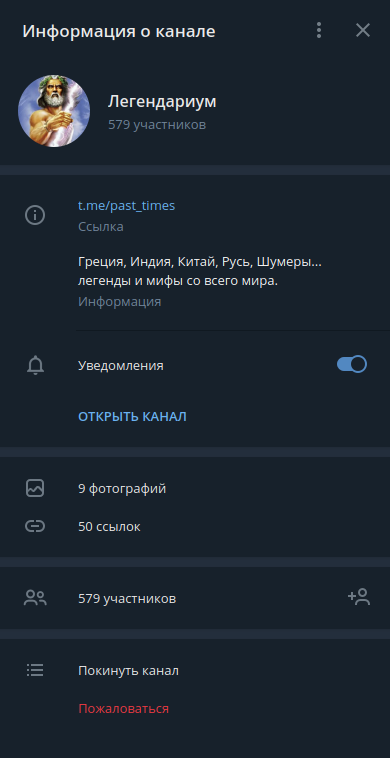
In the upper right corner, next to the "X" icon, click on three dots. In the drop-down menu, select "Channel Management".

In the "Edit Channel" menu that appears, you need to select the "Administrators" item.
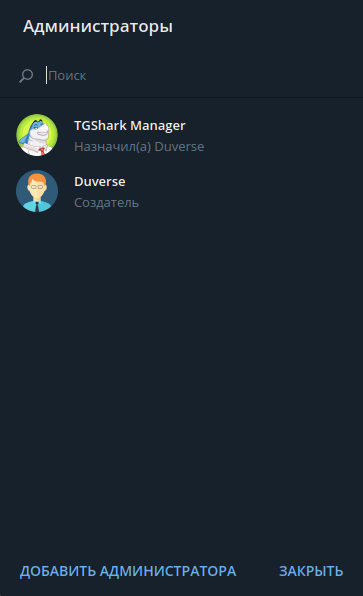
In the window that appears, you need to click the "Add Administrator" button, which is located at the bottom of the window next to the "Close" button.

In the administrators search window - look for the tagiobot bot. As soon as we find - click on it, after which - the telegram will most likely give you the following warning, where you need to click the "OK" button.

After clicking on the "OK" button, you will be asked to set the permissions for the bot. Because the bot automates the processes of advertising - you need to mark the points as shown in the picture below.
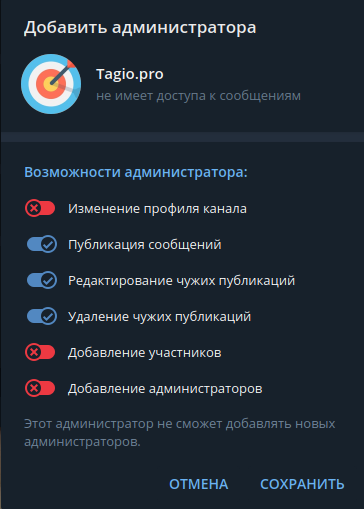
Click "Save." Now you can safely add your channel on the corresponding page.
P.S. If you still have problems, or have questions, contact the telegram support service.

Остались вопросы?
Напишите нам в наш Telegram чат или почитайте раздел FAQ, чтобы найти ответ на распространенные вопросы.